




NAS Doctor
NAS Doctor
Get Started with Apps!
Get Started with Apps!
App Version:
0.10.4
(Changelog)
Keywords: monitoring, diagnostics, smart, health, nas, dashboard, gpu
Train: Community
Home Page: https://github.com/mcdays94/nas-doctor
NAS Doctor Details
Added: 2026-11-24
Last Updated: 2026-11-25
Added: 2026-11-24
Last Updated: 2026-11-25
NAS Doctor is a local diagnostic and monitoring tool for your NAS.
Run as Context- Container [nas-doctor] runs as root user and group.
Group: 0 / Host group is [root]
User: 0 / Host user is [root]
Screenshots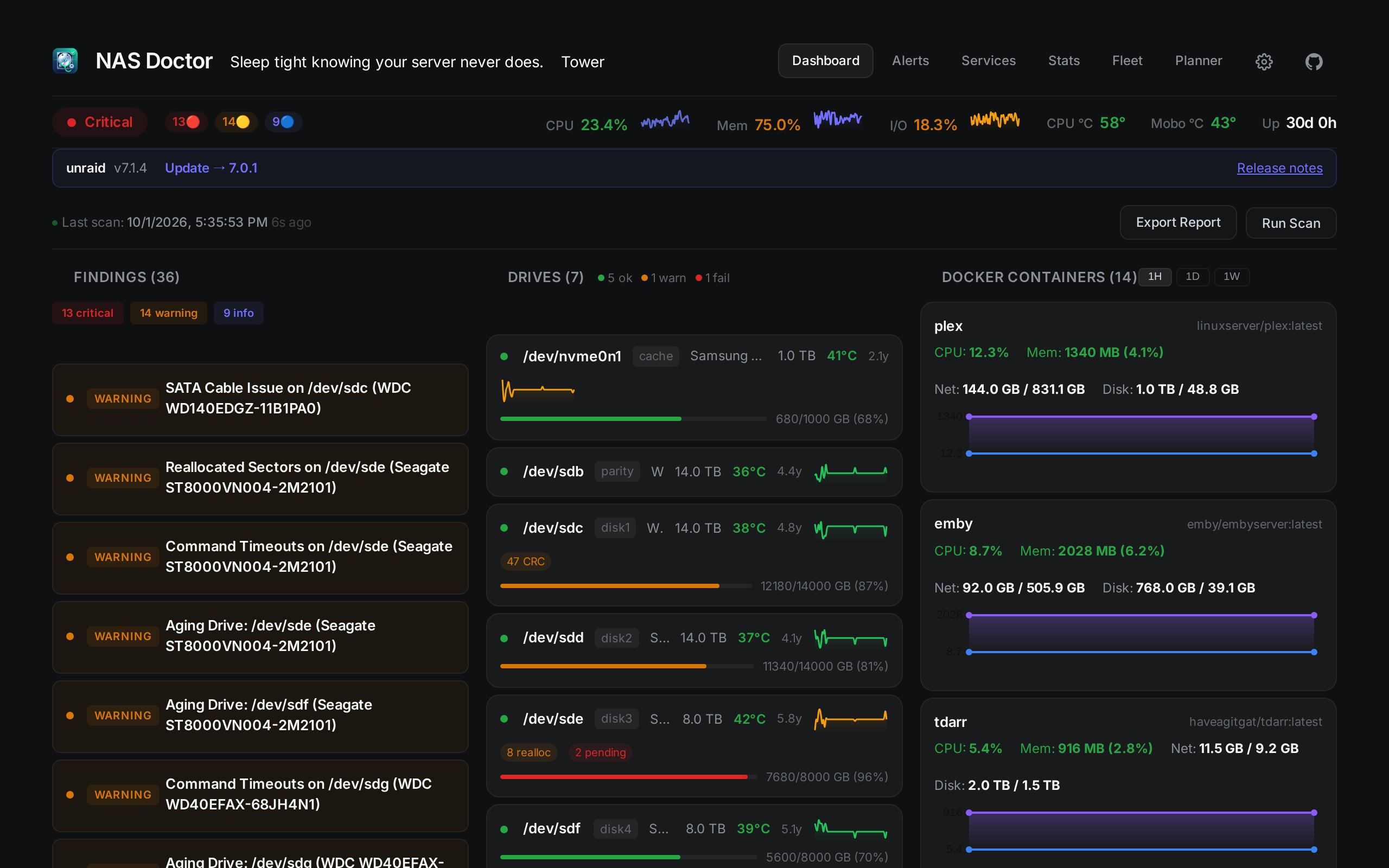
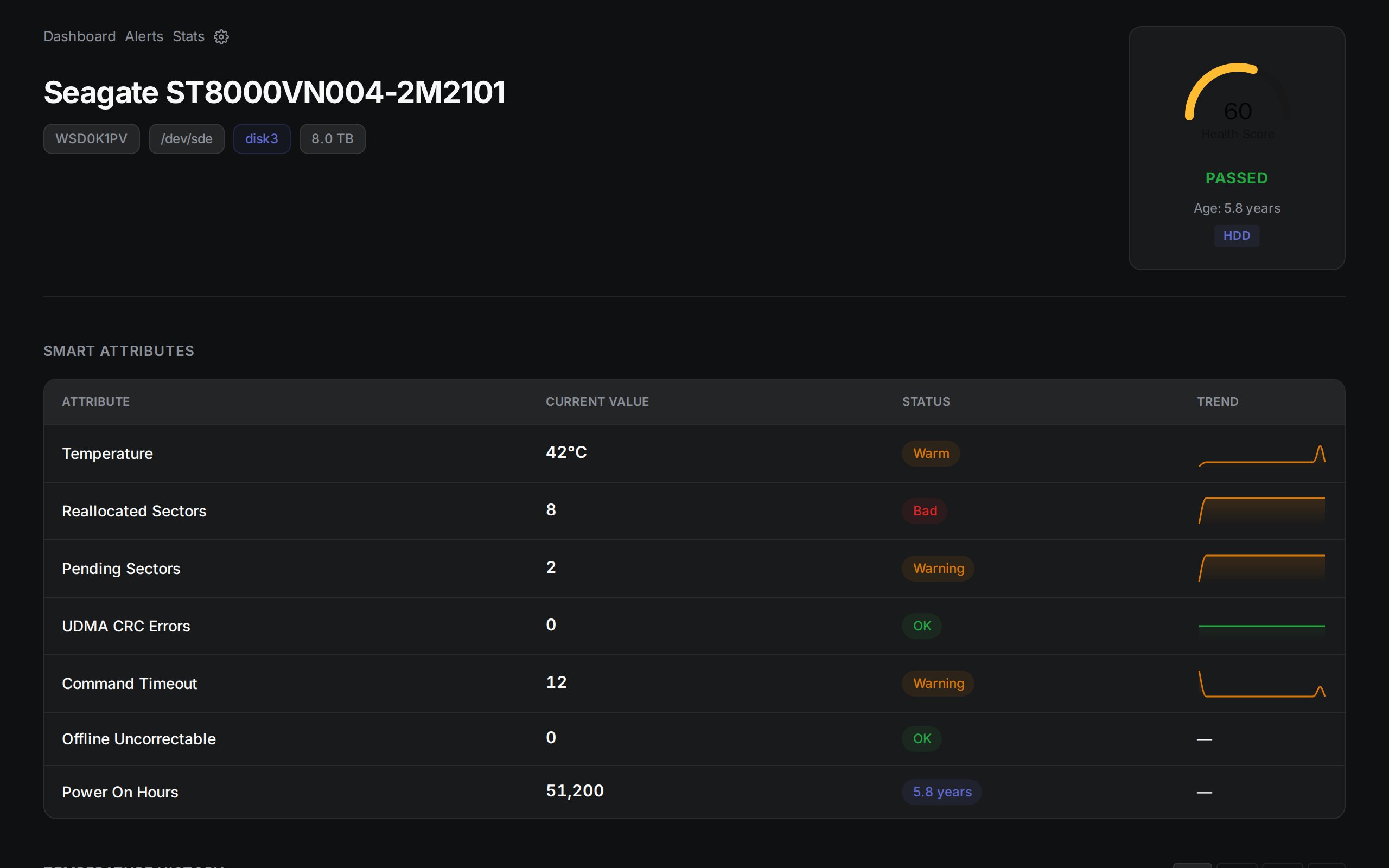
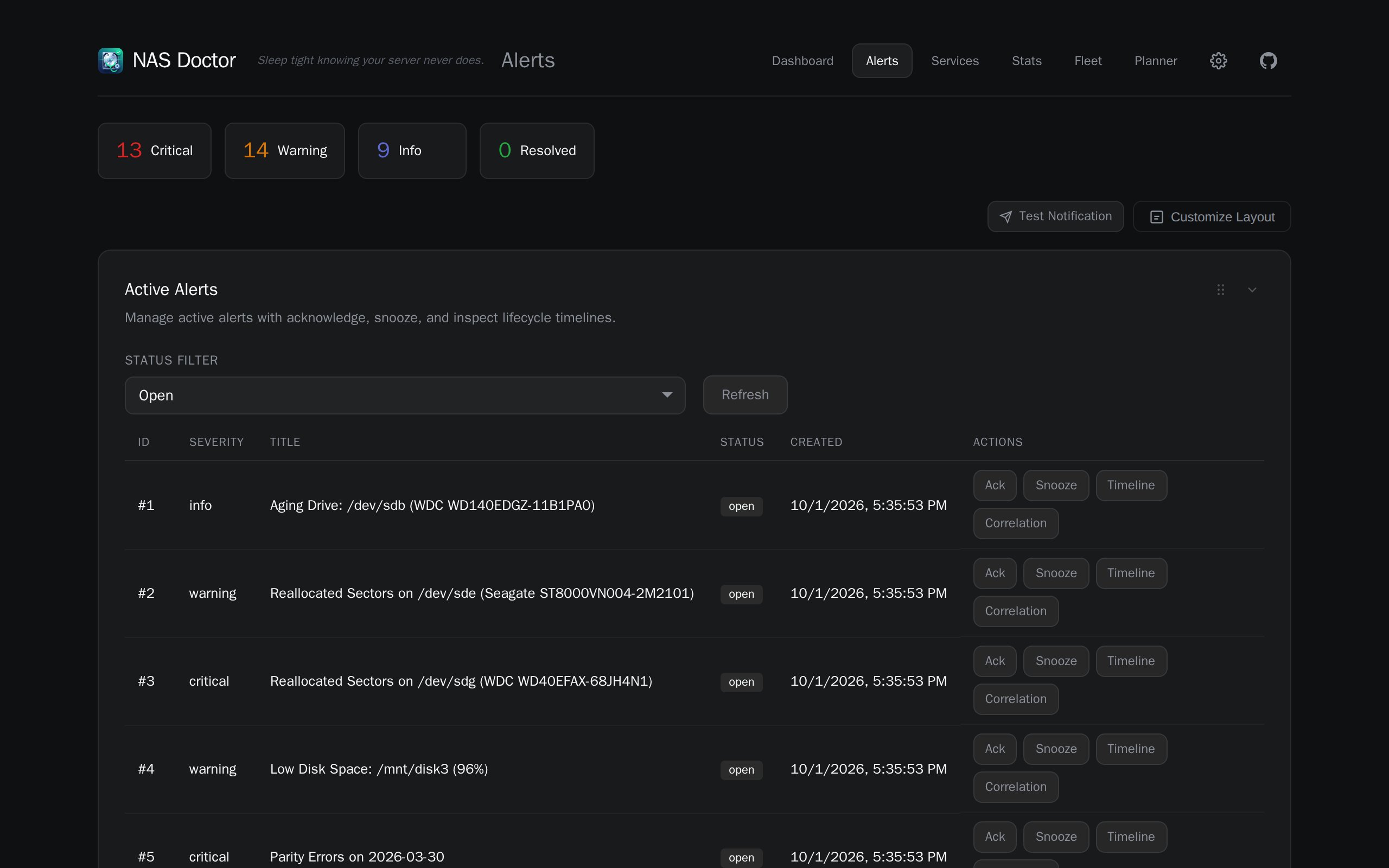
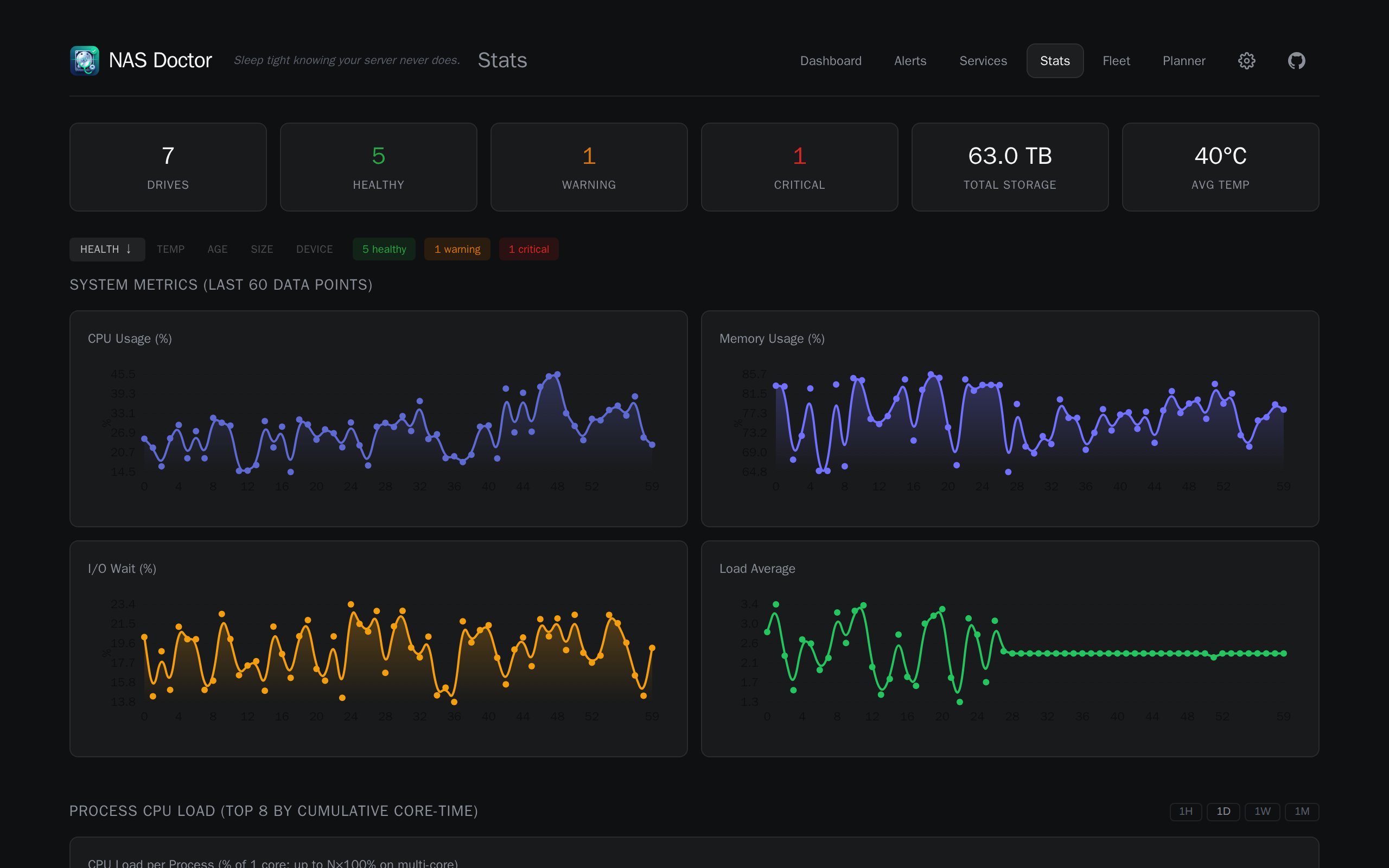
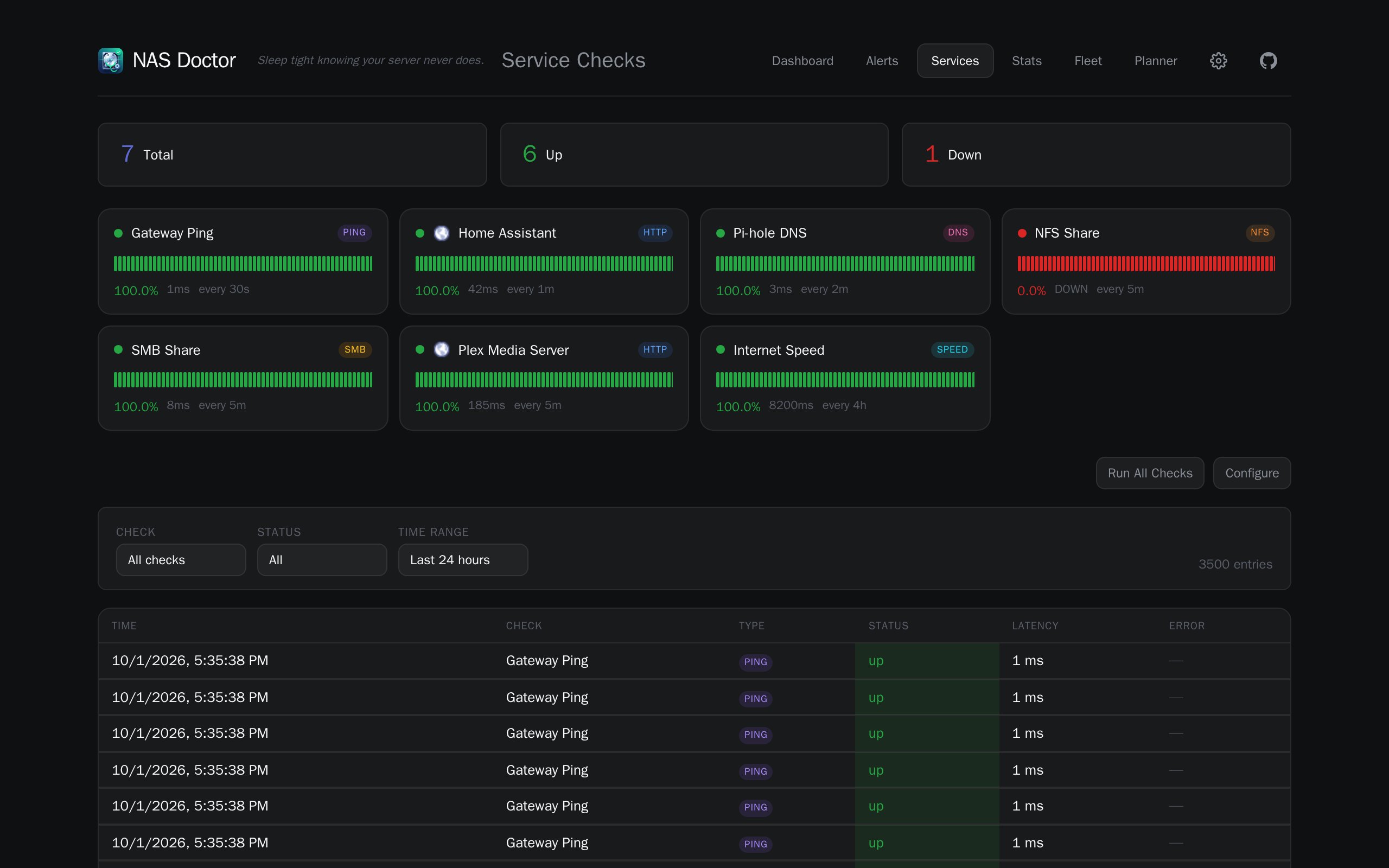
×
![Full Screenshot]()
Host Mounts
- /var/run/docker.sock : Docker socket for container monitoring
- /dev : Device nodes for SMART and GPU access
- /sys : Sysfs for GPU telemetry and drive mapping
Security Capabilities
- NAS Doctor is able to perform raw I/O operations
App Metadata (Raw File)
{
"1.0.1": {
"healthy": true,
"supported": true,
"healthy_error": null,
"location": "/__w/apps/apps/trains/community/nas-doctor/1.0.1",
"last_update": "2026-11-25 12:10:35",
"required_features": [],
"human_version": "0.10.4_1.0.1",
"version": "1.0.1",
"app_metadata": {
"app_version": "0.10.4",
"capabilities": [
{
"description": "NAS Doctor is able to perform raw I/O operations",
"name": "SYS_RAWIO"
}
],
"categories": [
"monitoring"
],
"changelog_url": "https://github.com/mcdays94/nas-doctor/releases",
"date_added": "2026-11-24",
"description": "NAS Doctor is a local diagnostic and monitoring tool for your NAS.",
"home": "https://github.com/mcdays94/nas-doctor",
"host_mounts": [
{
"description": "Docker socket for container monitoring",
"host_path": "/var/run/docker.sock"
},
{
"description": "Device nodes for SMART and GPU access",
"host_path": "/dev"
},
{
"description": "Sysfs for GPU telemetry and drive mapping",
"host_path": "/sys"
}
],
"icon": "https://media.sys.truenas.net/apps/nas-doctor/icons/icon.png",
"keywords": [
"monitoring",
"diagnostics",
"smart",
"health",
"nas",
"dashboard",
"gpu"
],
"lib_version": "2.3.22",
"lib_version_hash": "9e1c926d174eeac7c158a956a7aa3e2d87b01c2e99c733dd500f388468e95213",
"maintainers": [
{
"email": "dev@truenas.com",
"name": "truenas",
"url": "https://www.truenas.com/"
}
],
"name": "nas-doctor",
"risks": [
{
"key": "docker_access",
"label": "Docker Socket Access"
},
{
"key": "host_capabilities",
"label": "Extended System Capabilities"
},
{
"key": "host_network",
"label": "Host Networking"
},
{
"key": "host_pid",
"label": "Host Process Namespace"
}
],
"run_as_context": [
{
"description": "Container [nas-doctor] runs as root user and group.",
"gid": 0,
"group_name": "Host group is [root]",
"uid": 0,
"user_name": "Host user is [root]"
}
],
"screenshots": [
"https://media.sys.truenas.net/apps/nas-doctor/screenshots/screenshot1.jpg",
"https://media.sys.truenas.net/apps/nas-doctor/screenshots/screenshot2.jpg",
"https://media.sys.truenas.net/apps/nas-doctor/screenshots/screenshot3.jpg",
"https://media.sys.truenas.net/apps/nas-doctor/screenshots/screenshot4.jpg",
"https://media.sys.truenas.net/apps/nas-doctor/screenshots/screenshot5.jpg"
],
"sources": [
"https://apps.truenas.com/catalog/nas-doctor_community/",
"https://github.com/mcdays94/nas-doctor"
],
"title": "NAS Doctor",
"train": "community",
"version": "1.0.1"
},
"schema": {
"groups": [
{
"name": "NAS Doctor Configuration",
"description": "Configure NAS Doctor"
},
{
"name": "Network Configuration",
"description": "Configure Network for NAS Doctor"
},
{
"name": "Storage Configuration",
"description": "Configure Storage for NAS Doctor"
},
{
"name": "Labels Configuration",
"description": "Configure Labels for NAS Doctor"
},
{
"name": "Resources Configuration",
"description": "Configure Resources for NAS Doctor"
}
],
"questions": [
{
"variable": "TZ",
"group": "NAS Doctor Configuration",
"label": "Timezone",
"schema": {
"type": "string",
"default": "Etc/UTC",
"required": true,
"$ref": [
"definitions/timezone"
]
}
},
{
"variable": "nas_doctor",
"label": "",
"group": "NAS Doctor Configuration",
"schema": {
"type": "dict",
"attrs": [
{
"variable": "scan_interval",
"label": "Scan Interval",
"description": "How often to run diagnostic scans.",
"schema": {
"type": "string",
"default": "30m",
"required": true,
"enum": [
{
"value": "30m",
"description": "Every 30 minutes"
},
{
"value": "1h",
"description": "Every hour"
},
{
"value": "3h",
"description": "Every 3 hours"
},
{
"value": "6h",
"description": "Every 6 hours"
},
{
"value": "12h",
"description": "Every 12 hours"
},
{
"value": "24h",
"description": "Every 24 hours"
}
]
}
},
{
"variable": "mount_docker_socket",
"label": "Mount Docker Socket",
"description": "Mount the Docker socket to enable container monitoring.</br>\nThis gives the app full control over Docker socket.\n",
"schema": {
"type": "boolean",
"default": true
}
},
{
"variable": "mount_dev",
"label": "Mount /dev",
"description": "Mount /dev to enable SMART disk health monitoring and GPU device access.</br>\nRequired for SMART to work on most systems.\n",
"schema": {
"type": "boolean",
"default": true
}
},
{
"variable": "mount_sys",
"label": "Mount /sys",
"description": "Mount /sys to enable GPU telemetry (NVIDIA/Intel/AMD) and drive mapping.</br>\nRequired for GPU monitoring.\n",
"schema": {
"type": "boolean",
"default": true
}
},
{
"variable": "additional_envs",
"label": "Additional Environment Variables",
"schema": {
"type": "list",
"default": [],
"items": [
{
"variable": "env",
"label": "Environment Variable",
"schema": {
"type": "dict",
"attrs": [
{
"variable": "name",
"label": "Name",
"schema": {
"type": "string",
"required": true
}
},
{
"variable": "value",
"label": "Value",
"schema": {
"type": "string"
}
}
]
}
}
]
}
}
]
}
},
{
"variable": "network",
"label": "",
"group": "Network Configuration",
"schema": {
"type": "dict",
"attrs": [
{
"variable": "web_port",
"label": "WebUI Port",
"schema": {
"type": "dict",
"attrs": [
{
"variable": "bind_mode",
"label": "Port Bind Mode",
"description": "The port bind mode.</br>\n- Publish: The port will be published on the host for external access.</br>\n- Expose: The port will be exposed for inter-container communication.</br>\n- None: The port will not be exposed or published.</br>\nNote: If the Dockerfile defines an EXPOSE directive,\nthe port will still be exposed for inter-container communication regardless of this setting.\n",
"schema": {
"type": "string",
"default": "published",
"enum": [
{
"value": "published",
"description": "Publish port on the host for external access"
},
{
"value": "exposed",
"description": "Expose port for inter-container communication"
},
{
"value": "",
"description": "None"
}
]
}
},
{
"variable": "port_number",
"label": "Port Number",
"schema": {
"type": "int",
"default": 30620,
"min": 1,
"max": 65535,
"required": true
}
},
{
"variable": "host_ips",
"label": "Host IPs",
"description": "IPs on the host to bind this port",
"schema": {
"type": "list",
"show_if": [
[
"bind_mode",
"=",
"published"
]
],
"default": [],
"items": [
{
"variable": "host_ip",
"label": "Host IP",
"schema": {
"type": "string",
"required": true,
"$ref": [
"definitions/node_bind_ip"
]
}
}
]
}
}
]
}
},
{
"variable": "networks",
"label": "Networks",
"description": "The docker networks to join",
"schema": {
"type": "list",
"show_if": [
[
"host_network",
"=",
false
]
],
"default": [],
"items": [
{
"variable": "network",
"label": "Network",
"schema": {
"type": "dict",
"attrs": [
{
"variable": "name",
"label": "Name",
"description": "The name of the network to join.</br>\nThe network must already exist.\n",
"schema": {
"type": "string",
"default": "",
"required": true
}
},
{
"variable": "containers",
"label": "Containers",
"description": "The containers to add to this network.",
"schema": {
"type": "list",
"items": [
{
"variable": "container",
"label": "Container",
"schema": {
"type": "dict",
"attrs": [
{
"variable": "name",
"label": "Container Name",
"schema": {
"type": "string",
"required": true,
"enum": [
{
"value": "nas-doctor",
"description": "nas-doctor"
}
]
}
},
{
"variable": "config",
"label": "Container Network Configuration",
"schema": {
"type": "dict",
"attrs": [
{
"variable": "aliases",
"label": "Aliases (Optional)",
"description": "The network aliases to use for this container on this network.",
"schema": {
"type": "list",
"default": [],
"items": [
{
"variable": "alias",
"label": "Alias",
"schema": {
"type": "string"
}
}
]
}
},
{
"variable": "interface_name",
"label": "Interface Name (Optional)",
"description": "The network interface name to use for this network",
"schema": {
"type": "string"
}
},
{
"variable": "mac_address",
"label": "MAC Address (Optional)",
"description": "The MAC address to use for this network interface.",
"schema": {
"type": "string"
}
},
{
"variable": "ipv4_address",
"label": "IPv4 Address (Optional)",
"description": "The IPv4 address to use for this network interface.",
"schema": {
"type": "string"
}
},
{
"variable": "ipv6_address",
"label": "IPv6 Address (Optional)",
"description": "The IPv6 address to use for this network interface.",
"schema": {
"type": "string"
}
},
{
"variable": "gw_priority",
"label": "Gateway Priority (Optional)",
"description": "Indicates the priority of the gateway for this network interface.",
"schema": {
"type": "int",
"null": true
}
},
{
"variable": "priority",
"label": "Priority (Optional)",
"description": "Indicates in which order Compose connects the service\u2019s containers to its networks.",
"schema": {
"type": "int",
"null": true
}
}
]
}
}
]
}
}
]
}
}
]
}
}
]
}
},
{
"variable": "host_network",
"label": "Host Network",
"description": "Bind to the host network. It's recommended to keep this disabled.\n",
"schema": {
"type": "boolean",
"default": false
}
}
]
}
},
{
"variable": "storage",
"label": "",
"group": "Storage Configuration",
"schema": {
"type": "dict",
"attrs": [
{
"variable": "data",
"label": "Data Storage",
"description": "Persistent storage for the SQLite database, configuration and backups.",
"schema": {
"type": "dict",
"attrs": [
{
"variable": "type",
"label": "Type",
"description": "ixVolume: Is dataset created automatically by the system.</br>\nHost Path: Is a path that already exists on the system.\n",
"schema": {
"type": "string",
"required": true,
"default": "ix_volume",
"enum": [
{
"value": "host_path",
"description": "Host Path (Path that already exists on the system)"
},
{
"value": "ix_volume",
"description": "ixVolume (Dataset created automatically by the system)"
}
]
}
},
{
"variable": "ix_volume_config",
"label": "ixVolume Configuration",
"description": "The configuration for the ixVolume dataset.",
"schema": {
"type": "dict",
"show_if": [
[
"type",
"=",
"ix_volume"
]
],
"$ref": [
"normalize/ix_volume"
],
"attrs": [
{
"variable": "acl_enable",
"label": "Enable ACL",
"description": "Enable ACL for the storage.",
"schema": {
"type": "boolean",
"default": false
}
},
{
"variable": "dataset_name",
"label": "Dataset Name",
"description": "The name of the dataset to use for storage.",
"schema": {
"type": "string",
"required": true,
"hidden": true,
"default": "data"
}
},
{
"variable": "acl_entries",
"label": "ACL Configuration",
"schema": {
"type": "dict",
"show_if": [
[
"acl_enable",
"=",
true
]
],
"attrs": []
}
}
]
}
},
{
"variable": "host_path_config",
"label": "Host Path Configuration",
"schema": {
"type": "dict",
"show_if": [
[
"type",
"=",
"host_path"
]
],
"attrs": [
{
"variable": "acl_enable",
"label": "Enable ACL",
"description": "Enable ACL for the storage.",
"schema": {
"type": "boolean",
"default": false
}
},
{
"variable": "acl",
"label": "ACL Configuration",
"schema": {
"type": "dict",
"show_if": [
[
"acl_enable",
"=",
true
]
],
"attrs": [],
"$ref": [
"normalize/acl"
]
}
},
{
"variable": "path",
"label": "Host Path",
"description": "The host path to use for storage.",
"schema": {
"type": "hostpath",
"show_if": [
[
"acl_enable",
"=",
false
]
],
"required": true
}
}
]
}
}
]
}
},
{
"variable": "additional_storage",
"label": "Additional Storage",
"description": "To monitor the disk space of a dataset, add it here as a read only\nHost Path with a mount path under /host/mnt (for example /host/mnt/tank/media).\n",
"schema": {
"type": "list",
"default": [],
"items": [
{
"variable": "storageEntry",
"label": "Storage Entry",
"schema": {
"type": "dict",
"attrs": [
{
"variable": "type",
"label": "Type",
"description": "ixVolume: Is dataset created automatically by the system.</br>\nHost Path: Is a path that already exists on the system.</br>\nSMB Share: Is a SMB share that is mounted to as a volume.</br>\nNFS Share: Is a NFS share that is mounted to as a volume.\n",
"schema": {
"type": "string",
"required": true,
"default": "ix_volume",
"enum": [
{
"value": "host_path",
"description": "Host Path (Path that already exists on the system)"
},
{
"value": "ix_volume",
"description": "ixVolume (Dataset created automatically by the system)"
},
{
"value": "cifs",
"description": "SMB/CIFS Share (Mounts a volume to a SMB share)"
},
{
"value": "nfs",
"description": "NFS Share (Mounts a volume to a NFS share)"
}
]
}
},
{
"variable": "read_only",
"label": "Read Only",
"description": "Mount the volume as read only.",
"schema": {
"type": "boolean",
"default": false
}
},
{
"variable": "mount_path",
"label": "Mount Path",
"description": "The path inside the container to mount the storage.",
"schema": {
"type": "path",
"required": true
}
},
{
"variable": "host_path_config",
"label": "Host Path Configuration",
"schema": {
"type": "dict",
"show_if": [
[
"type",
"=",
"host_path"
]
],
"attrs": [
{
"variable": "acl_enable",
"label": "Enable ACL",
"description": "Enable ACL for the storage.",
"schema": {
"type": "boolean",
"default": false
}
},
{
"variable": "acl",
"label": "ACL Configuration",
"schema": {
"type": "dict",
"show_if": [
[
"acl_enable",
"=",
true
]
],
"attrs": [],
"$ref": [
"normalize/acl"
]
}
},
{
"variable": "path",
"label": "Host Path",
"description": "The host path to use for storage.",
"schema": {
"type": "hostpath",
"show_if": [
[
"acl_enable",
"=",
false
]
],
"required": true
}
}
]
}
},
{
"variable": "ix_volume_config",
"label": "ixVolume Configuration",
"description": "The configuration for the ixVolume dataset.",
"schema": {
"type": "dict",
"show_if": [
[
"type",
"=",
"ix_volume"
]
],
"$ref": [
"normalize/ix_volume"
],
"attrs": [
{
"variable": "acl_enable",
"label": "Enable ACL",
"description": "Enable ACL for the storage.",
"schema": {
"type": "boolean",
"default": false
}
},
{
"variable": "dataset_name",
"label": "Dataset Name",
"description": "The name of the dataset to use for storage.",
"schema": {
"type": "string",
"required": true,
"default": "storage_entry"
}
},
{
"variable": "acl_entries",
"label": "ACL Configuration",
"schema": {
"type": "dict",
"show_if": [
[
"acl_enable",
"=",
true
]
],
"attrs": [],
"$ref": [
"normalize/acl"
]
}
}
]
}
},
{
"variable": "cifs_config",
"label": "SMB Configuration",
"description": "The configuration for the SMB dataset.",
"schema": {
"type": "dict",
"show_if": [
[
"type",
"=",
"cifs"
]
],
"attrs": [
{
"variable": "server",
"label": "Server",
"description": "The server to mount the SMB share.",
"schema": {
"type": "string",
"required": true
}
},
{
"variable": "path",
"label": "Path",
"description": "The path to mount the SMB share.",
"schema": {
"type": "string",
"required": true
}
},
{
"variable": "username",
"label": "Username",
"description": "The username to use for the SMB share.",
"schema": {
"type": "string",
"required": true
}
},
{
"variable": "password",
"label": "Password",
"description": "The password to use for the SMB share.",
"schema": {
"type": "string",
"required": true,
"private": true
}
},
{
"variable": "domain",
"label": "Domain",
"description": "The domain to use for the SMB share.",
"schema": {
"type": "string"
}
}
]
}
},
{
"variable": "nfs_config",
"label": "NFS Configuration",
"description": "The configuration for the NFS dataset.",
"schema": {
"type": "dict",
"show_if": [
[
"type",
"=",
"nfs"
]
],
"attrs": [
{
"variable": "server",
"label": "Server",
"description": "The server to mount the NFS share.",
"schema": {
"type": "string",
"required": true
}
},
{
"variable": "path",
"label": "Path",
"description": "The path to mount the NFS share.",
"schema": {
"type": "string",
"required": true
}
}
]
}
}
]
}
}
]
}
}
]
}
},
{
"variable": "labels",
"label": "",
"group": "Labels Configuration",
"schema": {
"type": "list",
"default": [],
"items": [
{
"variable": "label",
"label": "Label",
"schema": {
"type": "dict",
"attrs": [
{
"variable": "key",
"label": "Key",
"schema": {
"type": "string",
"required": true
}
},
{
"variable": "value",
"label": "Value",
"schema": {
"type": "string",
"required": true
}
},
{
"variable": "containers",
"label": "Containers",
"description": "Containers where the label should be applied",
"schema": {
"type": "list",
"items": [
{
"variable": "container",
"label": "Container",
"schema": {
"type": "string",
"required": true,
"enum": [
{
"value": "nas-doctor",
"description": "nas-doctor"
}
]
}
}
]
}
}
]
}
}
]
}
},
{
"variable": "resources",
"label": "",
"group": "Resources Configuration",
"schema": {
"type": "dict",
"attrs": [
{
"variable": "limits",
"label": "Limits",
"schema": {
"type": "dict",
"attrs": [
{
"variable": "cpus",
"label": "CPUs",
"description": "CPUs limit for NAS Doctor.",
"schema": {
"type": "int",
"default": 2,
"required": true
}
},
{
"variable": "memory",
"label": "Memory (in MB)",
"description": "Memory limit for NAS Doctor.",
"schema": {
"type": "int",
"default": 4096,
"required": true
}
}
]
}
}
]
}
}
]
},
"readme": "<h1>NAS Doctor</h1> <p><a href=\"https://github.com/mcdays94/nas-doctor\">NAS Doctor</a> is a local diagnostic and monitoring tool for your NAS.</p> <!-- x-readme:warnings:start --> <p><strong>!!! WARNING !!!</strong></p> <p>This application can be granted additional elevated permissions beyond standard containerization protections, depending on the configuration. Use at your own risk.</p> <p>The following additional privileges may be enabled from installing this application:</p> <p>\u2022 Docker Socket Access</p> <p>\u2022 Extended System Capabilities</p> <p>\u2022 Host Networking</p> <p>\u2022 Host Process Namespace</p> <!-- x-readme:warnings:end -->",
"changelog": null,
"chart_metadata": {
"app_version": "0.10.4",
"capabilities": [
{
"description": "NAS Doctor is able to perform raw I/O operations",
"name": "SYS_RAWIO"
}
],
"categories": [
"monitoring"
],
"changelog_url": "https://github.com/mcdays94/nas-doctor/releases",
"date_added": "2026-11-24",
"description": "NAS Doctor is a local diagnostic and monitoring tool for your NAS.",
"home": "https://github.com/mcdays94/nas-doctor",
"host_mounts": [
{
"description": "Docker socket for container monitoring",
"host_path": "/var/run/docker.sock"
},
{
"description": "Device nodes for SMART and GPU access",
"host_path": "/dev"
},
{
"description": "Sysfs for GPU telemetry and drive mapping",
"host_path": "/sys"
}
],
"icon": "https://media.sys.truenas.net/apps/nas-doctor/icons/icon.png",
"keywords": [
"monitoring",
"diagnostics",
"smart",
"health",
"nas",
"dashboard",
"gpu"
],
"lib_version": "2.3.22",
"lib_version_hash": "9e1c926d174eeac7c158a956a7aa3e2d87b01c2e99c733dd500f388468e95213",
"maintainers": [
{
"email": "dev@truenas.com",
"name": "truenas",
"url": "https://www.truenas.com/"
}
],
"name": "nas-doctor",
"risks": [
{
"key": "docker_access",
"label": "Docker Socket Access"
},
{
"key": "host_capabilities",
"label": "Extended System Capabilities"
},
{
"key": "host_network",
"label": "Host Networking"
},
{
"key": "host_pid",
"label": "Host Process Namespace"
}
],
"run_as_context": [
{
"description": "Container [nas-doctor] runs as root user and group.",
"gid": 0,
"group_name": "Host group is [root]",
"uid": 0,
"user_name": "Host user is [root]"
}
],
"screenshots": [
"https://media.sys.truenas.net/apps/nas-doctor/screenshots/screenshot1.jpg",
"https://media.sys.truenas.net/apps/nas-doctor/screenshots/screenshot2.jpg",
"https://media.sys.truenas.net/apps/nas-doctor/screenshots/screenshot3.jpg",
"https://media.sys.truenas.net/apps/nas-doctor/screenshots/screenshot4.jpg",
"https://media.sys.truenas.net/apps/nas-doctor/screenshots/screenshot5.jpg"
],
"sources": [
"https://apps.truenas.com/catalog/nas-doctor_community/",
"https://github.com/mcdays94/nas-doctor"
],
"title": "NAS Doctor",
"train": "community",
"version": "1.0.1"
}
}
}Support, maintenance, and documentation for applications within the Community catalog is handled by the TrueNAS community. The TrueNAS Applications Market hosts but does not validate or maintain any linked resources associated with this app.
There currently aren’t any resources available for this application!
Please help the TrueNAS community add resources here or discuss this application in the TrueNAS Community forum.