





Asigra DS-System

Get Started with Apps!
App Version: 14.2.0.12
Keywords: backup, restore, asigra
Train: Enterprise
Home Page: https://hub.docker.com/r/asigra/ds-system
Added: 2024-10-25
Last Updated: 2026-08-24
DS-System software enables you to offer a robust, scalable service to multiple customers. Ease of use comes from the agentless architecture: customers only need to install the DS-Client on one LAN computer, thereby eliminating the need to install software on each target backup / restore computer
Asigra DS-System Deployment Notes
TrueNAS Enterprise
TrueNAS Enterprise-licensed systems do not have applications available by default. To enable applications as part of the Enterprise license, consult with the TrueNAS Support team.
Official TrueNAS support for Enterprise apps falls under two tiers: Enterprise Deployment Support and Enterprise Application Support. Please review the App Support Definitions and consult with the TrueNAS Support Team for any further clarifications.
Deploying Enterprise MinIO: Basics
TrueNAS Enterprise-licensed systems do not have applications available by default. To enable applications as part of the Enterprise license, consult with the TrueNAS Support team.
Official TrueNAS support for Enterprise apps falls under two tiers: Enterprise Deployment Support and Enterprise Application Support. Please review the App Support Definitions and consult with the TrueNAS Support Team for any further clarifications.
Deploying Enterprise Syncthing
TrueNAS Enterprise-licensed systems do not have applications available by default. To enable applications as part of the Enterprise license, consult with the TrueNAS Support team.
Official TrueNAS support for Enterprise apps falls under two tiers: Enterprise Deployment Support and Enterprise Application Support. Please review the App Support Definitions and consult with the TrueNAS Support Team for any further clarifications.
Installing MinIO Enterprise MNMD
TrueNAS Enterprise-licensed systems do not have applications available by default. To enable applications as part of the Enterprise license, consult with the TrueNAS Support team.
Official TrueNAS support for Enterprise apps falls under two tiers: Enterprise Deployment Support and Enterprise Application Support. Please review the App Support Definitions and consult with the TrueNAS Support Team for any further clarifications.
Installing MinIO Enterprise SNMD
TrueNAS Enterprise-licensed systems do not have applications available by default. To enable applications as part of the Enterprise license, consult with the TrueNAS Support team.
Official TrueNAS support for Enterprise apps falls under two tiers: Enterprise Deployment Support and Enterprise Application Support. Please review the App Support Definitions and consult with the TrueNAS Support Team for any further clarifications.
MinIO (Enterprise)
Get Started with Apps!Requires TrueNAS: 24.10.2.2 or newer
App Version: RELEASE.2025-04-22T22-12-26Z
Keywords: object storage, minio, cloud, s3
Train: Enterprise
Home Page: https://min.ioMinIO™ Details
Added: 2024-08-15
Last Updated: 2026-09-02High Performance, Kubernetes Native Object Storage
Run as Context
- Container [minio] can run as any non-root user and group.
Group: 568 / Host group is [apps]
User: 568 / Host user is [apps]×App Metadata (Raw File)
{ "1.3.20": { "healthy": true, "supported": true, "healthy_error": null, "location": "/__w/apps/apps/trains/enterprise/minio/1.3.20", "last_update": "2026-09-02 20:56:51", "required_features": [], "human_version": "RELEASE.2025-04-22T22-12-26Z_1.3.20", "version": "1.3.20", "app_metadata": { "annotations": { "min_scale_version": "24.10.2.2" }, "app_version": "RELEASE.2025-04-22T22-12-26Z", "capabilities": [], "categories": [ "storage" ], "date_added": "2024-08-15", "description": "High Performance, Kubernetes Native Object Storage", "home": "https://min.io", "host_mounts": [], "icon": "https://media.sys.truenas.net/apps/ix-app/icons/icon.webp", "keywords": [ "object storage", "minio", "cloud", "s3" ], "lib_version": "2.1.77", "lib_version_hash": "1837f8e69ae1adc313330c3b1c2615e9b4d03c5459d657a5898bae78090f8195", "maintainers": [ { "email": "dev@truenas.com", "name": "truenas", "url": "https://www.truenas.com/" } ], "name": "minio", "run_as_context": [ { "description": "Container [minio] can run as any non-root user and group.", "gid": 568, "group_name": "Host group is [apps]", "uid": 568, "user_name": "Host user is [apps]" } ], "screenshots": [], "sources": [ "https://apps.truenas.com/catalog/minio_enterprise/", "https://github.com/minio/minio" ], "title": "MinIO\u2122", "train": "enterprise", "version": "1.3.20" }, "schema": { "groups": [ { "name": "MinIO\u2122 Configuration", "description": "Configure MinIO\u2122" }, { "name": "User and Group Configuration", "description": "Configure User and Group for MinIO\u2122" }, { "name": "Network Configuration", "description": "Configure Network for MinIO\u2122" }, { "name": "Storage Configuration", "description": "Configure Storage for MinIO\u2122" }, { "name": "Labels Configuration", "description": "Configure Labels for MinIO\u2122" }, { "name": "Resources Configuration", "description": "Configure Resources for MinIO\u2122" } ], "questions": [ { "variable": "minio", "label": "", "group": "MinIO\u2122 Configuration", "schema": { "type": "dict", "attrs": [ { "variable": "credentials", "label": "Credentials", "description": "The credentials for the root user.", "schema": { "type": "dict", "attrs": [ { "variable": "access_key", "label": "MinIO\u2122 Root User", "description": "Root user with access to all actions and resources on the deployment. </br>\nIt doubles as the \"access key\" for the MinIO\u2122 deployment.\n", "schema": { "type": "string", "min_length": 5, "required": true, "private": true } }, { "variable": "secret_key", "label": "MinIO\u2122 Root Password", "description": "Root password for the MinIO\u2122 root user.</br>\nIt doubles as the \"secret key\" for the MinIO\u2122 deployment.\n", "schema": { "type": "string", "min_length": 8, "required": true, "private": true } } ] } }, { "variable": "multi_mode", "label": "Multi Mode (SNMD or MNMD) Configuration", "description": "For Single Node Multi Drive (SNMD), the entry will look like this:</br>\nExample Entry - /data{1...4}</br></br>\nFor Multi Node Multi Drive (MNMD), the entry will look like this:</br>\nExample Entry - https://minio{1...3}.example.com:30000/data{1...4}</br></br>\nNote that each host must use the same port number and the same number of storage items.</br>\nIn both cases /data{1...4} is the directories to be used for MinIO\u2122.\nYou have to add additional storage for each data entry.\n", "schema": { "type": "dict", "attrs": [ { "variable": "enabled", "label": "Enabled", "description": "Enable Multi Mode", "schema": { "type": "boolean", "default": false } }, { "variable": "entries", "label": "Multi Mode (SNMD or MNMD) Entries", "schema": { "type": "list", "show_if": [ [ "enabled", "=", true ] ], "default": [], "items": [ { "variable": "item", "label": "", "schema": { "type": "string", "required": true } } ] } } ] } }, { "variable": "logging", "label": "", "description": "Logging configuration", "schema": { "type": "dict", "attrs": [ { "variable": "quiet", "label": "Quiet", "description": "Disables startup information.", "schema": { "type": "boolean", "default": false } }, { "variable": "anonymous", "label": "Anonymous", "description": "Hides sensitive information from logging.", "schema": { "type": "boolean", "default": false } } ] } }, { "variable": "additional_envs", "label": "Additional Environment Variables", "schema": { "type": "list", "default": [], "items": [ { "variable": "env", "label": "Environment Variable", "schema": { "type": "dict", "attrs": [ { "variable": "name", "label": "Name", "schema": { "type": "string", "required": true } }, { "variable": "value", "label": "Value", "schema": { "type": "string" } } ] } } ] } } ] } }, { "variable": "run_as", "label": "", "group": "User and Group Configuration", "schema": { "type": "dict", "attrs": [ { "variable": "user", "label": "User ID", "description": "The user id that MinIO\u2122 will run as.", "schema": { "type": "int", "min": 568, "default": 568, "required": true } }, { "variable": "group", "label": "Group ID", "description": "The group id that MinIO\u2122 will run as.", "schema": { "type": "int", "min": 568, "default": 568, "required": true } } ] } }, { "variable": "network", "label": "", "group": "Network Configuration", "schema": { "type": "dict", "attrs": [ { "variable": "api_port", "label": "API Port", "description": "The port for the MinIO\u2122 API.", "schema": { "type": "dict", "attrs": [ { "variable": "bind_mode", "label": "Port Bind Mode", "description": "The port bind mode.</br>\n- Publish: The port will be published on the host for external access.</br>\n- Expose: The port will be exposed for inter-container communication.</br>\n- None: The port will not be exposed or published.</br>\nNote: If the Dockerfile defines an EXPOSE directive,\nthe port will still be exposed for inter-container communication regardless of this setting.\n", "schema": { "type": "string", "default": "published", "enum": [ { "value": "published", "description": "Publish port on the host for external access" }, { "value": "exposed", "description": "Expose port for inter-container communication" }, { "value": "", "description": "None" } ] } }, { "variable": "port_number", "label": "Port Number", "schema": { "type": "int", "default": 30000, "min": 1, "max": 65535, "required": true } }, { "variable": "host_ips", "label": "Host IPs", "description": "IPs on the host to bind this port", "schema": { "type": "list", "show_if": [ [ "bind_mode", "=", "published" ] ], "default": [], "items": [ { "variable": "host_ip", "label": "Host IP", "schema": { "type": "string", "required": true, "$ref": [ "definitions/node_bind_ip" ] } } ] } } ] } }, { "variable": "console_port", "label": "Console Port (Web UI)", "description": "The port for the MinIO\u2122 Web UI.", "schema": { "type": "dict", "attrs": [ { "variable": "bind_mode", "label": "Port Bind Mode", "description": "The port bind mode.</br>\n- Publish: The port will be published on the host for external access.</br>\n- Expose: The port will be exposed for inter-container communication.</br>\n- None: The port will not be exposed or published.</br>\nNote: If the Dockerfile defines an EXPOSE directive,\nthe port will still be exposed for inter-container communication regardless of this setting.\n", "schema": { "type": "string", "default": "published", "enum": [ { "value": "published", "description": "Publish port on the host for external access" }, { "value": "exposed", "description": "Expose port for inter-container communication" }, { "value": "", "description": "None" } ] } }, { "variable": "port_number", "label": "Port Number", "schema": { "type": "int", "default": 30001, "min": 1, "max": 65535, "required": true } }, { "variable": "host_ips", "label": "Host IPs", "description": "IPs on the host to bind this port", "schema": { "type": "list", "show_if": [ [ "bind_mode", "=", "published" ] ], "default": [], "items": [ { "variable": "host_ip", "label": "Host IP", "schema": { "type": "string", "required": true, "$ref": [ "definitions/node_bind_ip" ] } } ] } } ] } }, { "variable": "server_url", "label": "Server URL", "description": "The URL that console will use to reach API</br>\nUsually the port is needed, unless you have a reverse proxy in front of MinIO\u2122.</br>\nFor example: </br>\n- https://minio1.example.com</br>\n- https://minio1.example.com:30000\n", "schema": { "type": "uri", "required": true } }, { "variable": "console_url", "label": "Console URL", "description": "The URL that console will provide as a redirect URL</br>\nUsually the port is needed, unless you have a reverse proxy in front of MinIO\u2122.</br>\nFor example: </br>\n- https://console.example.com.</br>\n- https://minio1.example.com:30001\n", "schema": { "type": "uri", "required": true } }, { "variable": "host_network", "label": "Host Network", "description": "Bind to the host network. It's recommended to keep this disabled.\n", "schema": { "type": "boolean", "default": false } }, { "variable": "certificate_id", "label": "Certificate", "description": "The certificate to use for MinIO\u2122", "schema": { "type": "int", "null": true, "$ref": [ "definitions/certificate" ] } } ] } }, { "variable": "storage", "label": "", "group": "Storage Configuration", "schema": { "type": "dict", "attrs": [ { "variable": "data_dirs", "label": "Data Directories", "schema": { "type": "list", "default": [ { "type": "ix_volume", "mount_path": "/data1", "ix_volume_config": { "dataset_name": "data1" } } ], "items": [ { "variable": "item", "label": "", "schema": { "type": "dict", "attrs": [ { "variable": "type", "label": "Type", "description": "ixVolume: Is dataset created automatically by the system.</br>\nHost Path: Is a path that already exists on the system.\n", "schema": { "type": "string", "required": true, "default": "host_path", "enum": [ { "value": "host_path", "description": "Host Path (Path that already exists on the system)" }, { "value": "ix_volume", "description": "ixVolume (Dataset created automatically by the system)" } ] } }, { "variable": "mount_path", "label": "Mount Path", "description": "The path inside the container to mount the storage.", "schema": { "type": "path", "required": true, "default": "/data1" } }, { "variable": "host_path_config", "label": "Host Path Configuration", "schema": { "type": "dict", "show_if": [ [ "type", "=", "host_path" ] ], "attrs": [ { "variable": "acl_enable", "label": "Enable ACL", "description": "Enable ACL for the storage.", "schema": { "type": "boolean", "default": false } }, { "variable": "acl", "label": "ACL Configuration", "schema": { "type": "dict", "show_if": [ [ "acl_enable", "=", true ] ], "attrs": [], "$ref": [ "normalize/acl" ] } }, { "variable": "path", "label": "Host Path", "description": "The host path to use for storage.", "schema": { "type": "hostpath", "show_if": [ [ "acl_enable", "=", false ] ], "required": true } } ] } }, { "variable": "ix_volume_config", "label": "ixVolume Configuration", "description": "The configuration for the ixVolume dataset.", "schema": { "type": "dict", "show_if": [ [ "type", "=", "ix_volume" ] ], "$ref": [ "normalize/ix_volume" ], "attrs": [ { "variable": "acl_enable", "label": "Enable ACL", "description": "Enable ACL for the storage.", "schema": { "type": "boolean", "default": false } }, { "variable": "dataset_name", "label": "Dataset Name", "description": "The name of the dataset to use for storage.", "schema": { "type": "string", "required": true, "default": "data1" } }, { "variable": "acl_entries", "label": "ACL Configuration", "schema": { "type": "dict", "show_if": [ [ "acl_enable", "=", true ] ], "attrs": [], "$ref": [ "normalize/acl" ] } } ] } } ] } } ] } } ] } }, { "variable": "labels", "label": "", "group": "Labels Configuration", "schema": { "type": "list", "default": [], "items": [ { "variable": "label", "label": "Label", "schema": { "type": "dict", "attrs": [ { "variable": "key", "label": "Key", "schema": { "type": "string", "required": true } }, { "variable": "value", "label": "Value", "schema": { "type": "string", "required": true } }, { "variable": "containers", "label": "Containers", "description": "Containers where the label should be applied", "schema": { "type": "list", "items": [ { "variable": "container", "label": "Container", "schema": { "type": "string", "required": true, "enum": [ { "value": "minio", "description": "minio" } ] } } ] } } ] } } ] } }, { "variable": "resources", "label": "", "group": "Resources Configuration", "schema": { "type": "dict", "attrs": [ { "variable": "limits", "label": "Limits", "schema": { "type": "dict", "attrs": [ { "variable": "cpus", "label": "CPUs", "description": "CPUs limit for MinIO\u2122.", "schema": { "type": "int", "default": 2, "required": true } }, { "variable": "memory", "label": "Memory (in MB)", "description": "Memory limit for MinIO\u2122.", "schema": { "type": "int", "default": 4096, "required": true } } ] } } ] } } ] }, "readme": "<h1>MinIO\u2122</h1> <p><a href=\"https://min.io\">MinIO\u2122</a> is a High Performance Object Storage released under the AGPLv3 License. It is API compatible with Amazon S3 cloud storage service. Use MinIO to build high performance infrastructure for machine learning, analytics and application data workloads.</p> <p>MinIO is a trademark of MinIO, Inc.</p>", "changelog": null, "chart_metadata": { "annotations": { "min_scale_version": "24.10.2.2" }, "app_version": "RELEASE.2025-04-22T22-12-26Z", "capabilities": [], "categories": [ "storage" ], "date_added": "2024-08-15", "description": "High Performance, Kubernetes Native Object Storage", "home": "https://min.io", "host_mounts": [], "icon": "https://media.sys.truenas.net/apps/ix-app/icons/icon.webp", "keywords": [ "object storage", "minio", "cloud", "s3" ], "lib_version": "2.1.77", "lib_version_hash": "1837f8e69ae1adc313330c3b1c2615e9b4d03c5459d657a5898bae78090f8195", "maintainers": [ { "email": "dev@truenas.com", "name": "truenas", "url": "https://www.truenas.com/" } ], "name": "minio", "run_as_context": [ { "description": "Container [minio] can run as any non-root user and group.", "gid": 568, "group_name": "Host group is [apps]", "uid": 568, "user_name": "Host user is [apps]" } ], "screenshots": [], "sources": [ "https://apps.truenas.com/catalog/minio_enterprise/", "https://github.com/minio/minio" ], "title": "MinIO\u2122", "train": "enterprise", "version": "1.3.20" } } }MinIO is a trademark of the MinIO Corporation.
Remote Assist
Get Started with Apps!App Version: v1.102.3
Keywords: remote assistance, vpn
Train: Enterprise
Home Page: https://truenas.comRemote Assist Details
Added: 2025-01-27
Last Updated: 2026-08-24Invite the TrueNAS team to remotely assist with your TrueNAS system.
Run as Context
- Container [remote-assist] runs as root user and group.
Group: 0 / Host group is [root]
User: 0 / Host user is [root]×Host Mounts
- /dev/net/tun : Network device
Security Capabilities
- Remote Assist is able to change file ownership arbitrarily
- Remote Assist is able to bypass file permission checks
- Remote Assist is able to bypass permission checks for file operations
- Remote Assist is able to perform network administration tasks
- Remote Assist is able to use raw and packet sockets
- Remote Assist is able to load and unload kernel modules
App Metadata (Raw File)
{ "1.0.44": { "healthy": true, "supported": true, "healthy_error": null, "location": "/__w/apps/apps/trains/enterprise/ix-remote-assist/1.0.44", "last_update": "2026-08-24 14:16:56", "required_features": [], "human_version": "v1.102.3_1.0.44", "version": "1.0.44", "app_metadata": { "annotations": { "disallow_multiple_instances": true }, "app_version": "v1.102.3", "capabilities": [ { "description": "Remote Assist is able to change file ownership arbitrarily", "name": "CHOWN" }, { "description": "Remote Assist is able to bypass file permission checks", "name": "DAC_OVERRIDE" }, { "description": "Remote Assist is able to bypass permission checks for file operations", "name": "FOWNER" }, { "description": "Remote Assist is able to perform network administration tasks", "name": "NET_ADMIN" }, { "description": "Remote Assist is able to use raw and packet sockets", "name": "NET_RAW" }, { "description": "Remote Assist is able to load and unload kernel modules", "name": "SYS_MODULE" } ], "categories": [ "networking" ], "date_added": "2025-01-27", "description": "Invite the TrueNAS team to remotely assist with your TrueNAS system.", "home": "https://truenas.com", "host_mounts": [ { "description": "Network device", "host_path": "/dev/net/tun" } ], "icon": "https://media.sys.truenas.net/apps/ix-app/icons/icon.webp", "keywords": [ "remote assistance", "vpn" ], "lib_version": "2.1.77", "lib_version_hash": "1837f8e69ae1adc313330c3b1c2615e9b4d03c5459d657a5898bae78090f8195", "maintainers": [ { "email": "dev@truenas.com", "name": "truenas", "url": "https://www.truenas.com/" } ], "name": "ix-remote-assist", "run_as_context": [ { "description": "Container [remote-assist] runs as root user and group.", "gid": 0, "group_name": "Host group is [root]", "uid": 0, "user_name": "Host user is [root]" } ], "screenshots": [], "sources": [ "https://apps.truenas.com/catalog/ix-remote-assist_enterprise/", "https://hub.docker.com/r/tailscale/tailscale", "https://truenas.com/" ], "title": "Remote Assist", "train": "enterprise", "version": "1.0.44" }, "schema": { "groups": [ { "name": "Configuration", "description": "Remote Assist is used by iX Support for Enterprise troubleshooting" }, { "name": "Storage Configuration", "description": "Configure Storage for Tailscale" } ], "questions": [ { "variable": "remote_assist", "label": "", "group": "Configuration", "schema": { "type": "dict", "attrs": [ { "variable": "hostname", "label": "System Identifier", "description": "Identifier for this System.</br>\nOne will be given to you by iX Support.\n", "schema": { "type": "string", "default": "truenas-scale", "valid_chars": "^[a-z0-9-]+$", "valid_chars_error": "Only lowercase letters, numbers, and hyphens are allowed.\n", "required": true } }, { "variable": "auth_key", "label": "Auth Key", "description": "The auth key for Remote Assistance.</br>\nPlease enter the key as provided by iX support.</br>\n", "schema": { "type": "string", "default": "", "required": true, "private": true } } ] } }, { "variable": "storage", "label": "", "group": "Storage Configuration", "schema": { "type": "dict", "hidden": true, "attrs": [ { "variable": "state", "label": "Tailscale State Storage", "description": "The path to store Tailscale State.", "schema": { "type": "dict", "attrs": [ { "variable": "type", "label": "Type", "description": "ixVolume: Is dataset created automatically by the system.</br>\nHost Path: Is a path that already exists on the system.\n", "schema": { "type": "string", "required": true, "default": "ix_volume", "enum": [ { "value": "ix_volume", "description": "ixVolume (Dataset created automatically by the system)" } ] } }, { "variable": "ix_volume_config", "label": "ixVolume Configuration", "description": "The configuration for the ixVolume dataset.", "schema": { "type": "dict", "show_if": [ [ "type", "=", "ix_volume" ] ], "$ref": [ "normalize/ix_volume" ], "attrs": [ { "variable": "acl_enable", "label": "Enable ACL", "description": "Enable ACL for the storage.", "schema": { "type": "boolean", "default": false } }, { "variable": "dataset_name", "label": "Dataset Name", "description": "The name of the dataset to use for storage.", "schema": { "type": "string", "required": true, "hidden": true, "default": "state" } }, { "variable": "acl_entries", "label": "ACL Configuration", "schema": { "type": "dict", "show_if": [ [ "acl_enable", "=", true ] ], "attrs": [] } } ] } } ] } } ] } } ] }, "readme": "<h1>Remote Assist</h1> <p><a href=\"https://truenas.com\">Remote Assist</a> iX support remote assistance for Enterprise Systems</p>", "changelog": null, "chart_metadata": { "annotations": { "disallow_multiple_instances": true }, "app_version": "v1.102.3", "capabilities": [ { "description": "Remote Assist is able to change file ownership arbitrarily", "name": "CHOWN" }, { "description": "Remote Assist is able to bypass file permission checks", "name": "DAC_OVERRIDE" }, { "description": "Remote Assist is able to bypass permission checks for file operations", "name": "FOWNER" }, { "description": "Remote Assist is able to perform network administration tasks", "name": "NET_ADMIN" }, { "description": "Remote Assist is able to use raw and packet sockets", "name": "NET_RAW" }, { "description": "Remote Assist is able to load and unload kernel modules", "name": "SYS_MODULE" } ], "categories": [ "networking" ], "date_added": "2025-01-27", "description": "Invite the TrueNAS team to remotely assist with your TrueNAS system.", "home": "https://truenas.com", "host_mounts": [ { "description": "Network device", "host_path": "/dev/net/tun" } ], "icon": "https://media.sys.truenas.net/apps/ix-app/icons/icon.webp", "keywords": [ "remote assistance", "vpn" ], "lib_version": "2.1.77", "lib_version_hash": "1837f8e69ae1adc313330c3b1c2615e9b4d03c5459d657a5898bae78090f8195", "maintainers": [ { "email": "dev@truenas.com", "name": "truenas", "url": "https://www.truenas.com/" } ], "name": "ix-remote-assist", "run_as_context": [ { "description": "Container [remote-assist] runs as root user and group.", "gid": 0, "group_name": "Host group is [root]", "uid": 0, "user_name": "Host user is [root]" } ], "screenshots": [], "sources": [ "https://apps.truenas.com/catalog/ix-remote-assist_enterprise/", "https://hub.docker.com/r/tailscale/tailscale", "https://truenas.com/" ], "title": "Remote Assist", "train": "enterprise", "version": "1.0.44" } } }Remote Assist
TrueNAS Enterprise-licensed systems do not have applications available by default. To enable applications as part of the Enterprise license, consult with the TrueNAS Support team.
Official TrueNAS support for Enterprise apps falls under two tiers: Enterprise Deployment Support and Enterprise Application Support. Please review the App Support Definitions and consult with the TrueNAS Support Team for any further clarifications.
Syncthing (Enterprise)
Get Started with Apps!Requires TrueNAS: 24.10.2.2 or newer
App Version: 2.1.2
Keywords: sync, file-sharing
Train: Enterprise
Home Page: https://syncthing.netSyncthing Details
Added: 2024-08-16
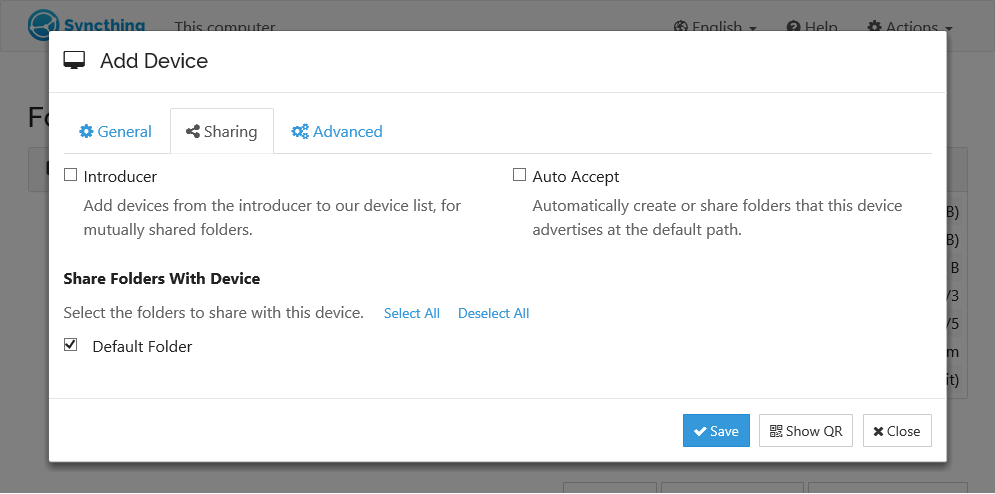
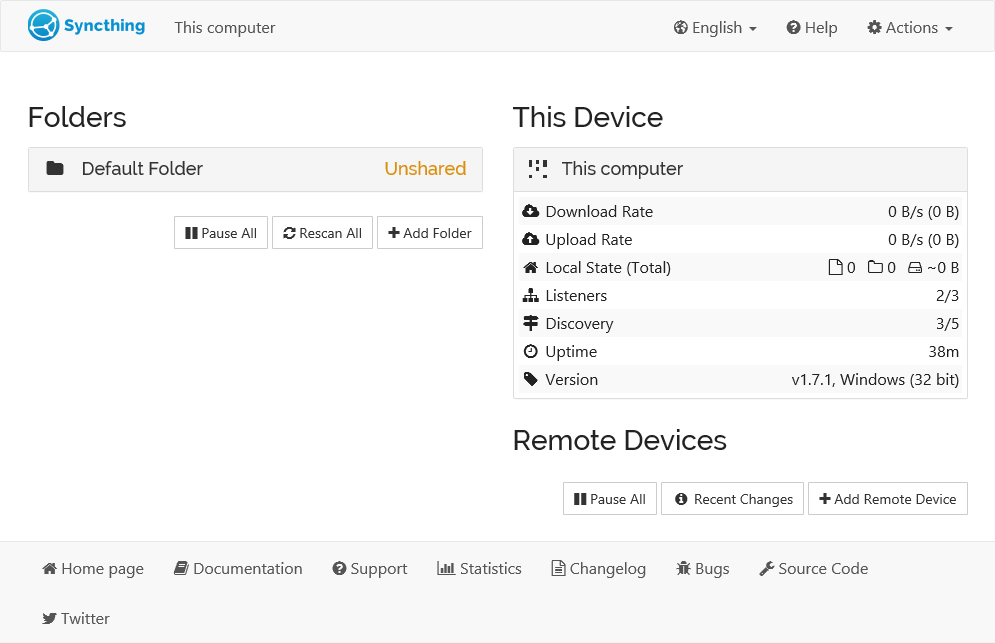
Last Updated: 2026-07-17Syncthing is a continuous file synchronization program.
Run as Context
- Container [syncthing] runs as root user and group.
Group: 0 / Host group is [root]
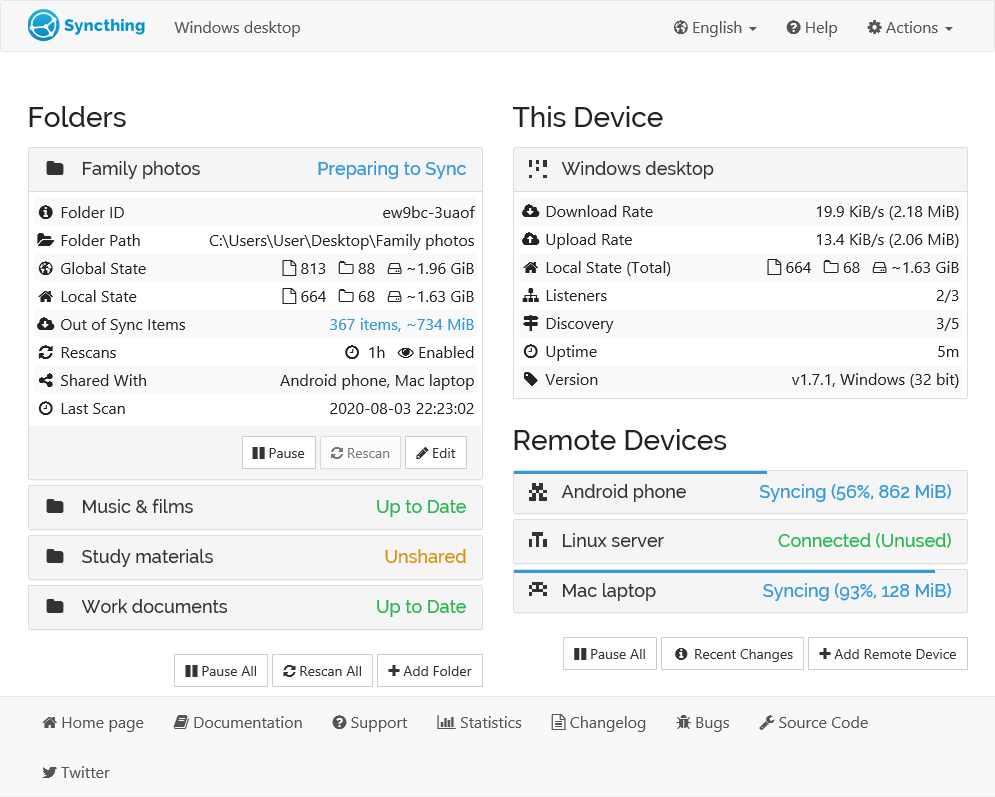
User: 0 / Host user is [root]Screenshots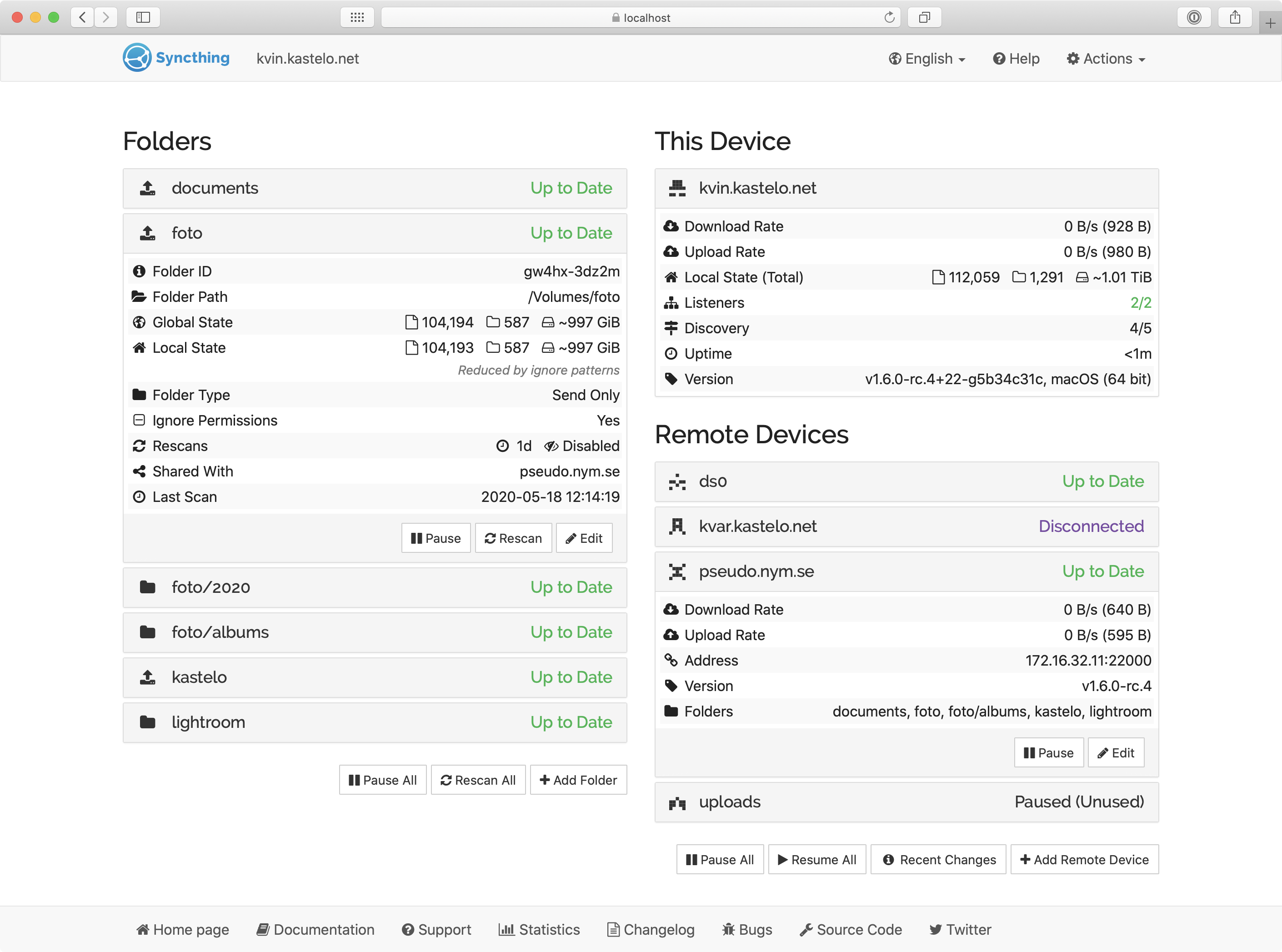
 ×
×Security Capabilities
- Syncthing is able to change file ownership arbitrarily
- Syncthing is able to bypass file permission checks
- Syncthing is able to bypass permission checks for file operations
- Syncthing is able to set file capabilities on other files
- Syncthing is able to change group ID of processes
- Syncthing is able to transfer capabilities between processes
- Syncthing is able to change user ID of processes
- Syncthing is able to perform system administration operations
App Metadata (Raw File)
{ "2.0.3": { "healthy": true, "supported": true, "healthy_error": null, "location": "/__w/apps/apps/trains/enterprise/syncthing/2.0.3", "last_update": "2026-07-17 14:33:03", "required_features": [], "human_version": "2.1.2_2.0.3", "version": "2.0.3", "app_metadata": { "annotations": { "min_scale_version": "24.10.2.2" }, "app_version": "2.1.2", "capabilities": [ { "description": "Syncthing is able to change file ownership arbitrarily", "name": "CHOWN" }, { "description": "Syncthing is able to bypass file permission checks", "name": "DAC_OVERRIDE" }, { "description": "Syncthing is able to bypass permission checks for file operations", "name": "FOWNER" }, { "description": "Syncthing is able to set file capabilities on other files", "name": "SETFCAP" }, { "description": "Syncthing is able to change group ID of processes", "name": "SETGID" }, { "description": "Syncthing is able to transfer capabilities between processes", "name": "SETPCAP" }, { "description": "Syncthing is able to change user ID of processes", "name": "SETUID" }, { "description": "Syncthing is able to perform system administration operations", "name": "SYS_ADMIN" } ], "categories": [ "storage" ], "date_added": "2024-08-16", "description": "Syncthing is a continuous file synchronization program.", "home": "https://syncthing.net", "host_mounts": [], "icon": "https://media.sys.truenas.net/apps/syncthing/icons/icon.svg", "keywords": [ "sync", "file-sharing" ], "lib_version": "2.1.77", "lib_version_hash": "1837f8e69ae1adc313330c3b1c2615e9b4d03c5459d657a5898bae78090f8195", "maintainers": [ { "email": "dev@truenas.com", "name": "truenas", "url": "https://www.truenas.com/" } ], "name": "syncthing", "run_as_context": [ { "description": "Container [syncthing] runs as root user and group.", "gid": 0, "group_name": "Host group is [root]", "uid": 0, "user_name": "Host user is [root]" } ], "screenshots": [ "https://media.sys.truenas.net/apps/syncthing/screenshots/screenshot1.png", "https://media.sys.truenas.net/apps/syncthing/screenshots/screenshot2.png", "https://media.sys.truenas.net/apps/syncthing/screenshots/screenshot3.png", "https://media.sys.truenas.net/apps/syncthing/screenshots/screenshot4.png" ], "sources": [ "https://apps.truenas.com/catalog/syncthing_enterprise/", "https://github.com/syncthing/syncthing", "https://hub.docker.com/r/syncthing/syncthing", "https://syncthing.net/" ], "title": "Syncthing", "train": "enterprise", "version": "2.0.3" }, "schema": { "groups": [ { "name": "Syncthing Configuration", "description": "Configure Syncthing" }, { "name": "User and Group Configuration", "description": "Configure User and Group for Syncthing" }, { "name": "Network Configuration", "description": "Configure Network for Syncthing" }, { "name": "Storage Configuration", "description": "Configure Storage for Syncthing" }, { "name": "Labels Configuration", "description": "Configure Labels for Syncthing" }, { "name": "Resources Configuration", "description": "Configure Resources for Syncthing" } ], "questions": [ { "variable": "TZ", "group": "Syncthing Configuration", "label": "Timezone", "schema": { "type": "string", "default": "Etc/UTC", "required": true, "$ref": [ "definitions/timezone" ] } }, { "variable": "syncthing", "label": "", "group": "Syncthing Configuration", "schema": { "type": "dict", "attrs": [ { "variable": "additional_envs", "label": "Additional Environment Variables", "schema": { "type": "list", "default": [], "items": [ { "variable": "env", "label": "Environment Variable", "schema": { "type": "dict", "attrs": [ { "variable": "name", "label": "Name", "schema": { "type": "string", "required": true } }, { "variable": "value", "label": "Value", "schema": { "type": "string" } } ] } } ] } } ] } }, { "variable": "run_as", "label": "", "group": "User and Group Configuration", "schema": { "type": "dict", "attrs": [ { "variable": "user", "label": "User ID", "description": "The user id that Syncthing will run as.", "schema": { "type": "int", "min": 568, "default": 568, "required": true } }, { "variable": "group", "label": "Group ID", "description": "The group id that Syncthing will run as.", "schema": { "type": "int", "min": 568, "default": 568, "required": true } } ] } }, { "variable": "network", "label": "", "group": "Network Configuration", "schema": { "type": "dict", "attrs": [ { "variable": "web_port", "label": "WebUI Port", "schema": { "type": "dict", "attrs": [ { "variable": "bind_mode", "label": "Port Bind Mode", "description": "The port bind mode.</br>\n- Publish: The port will be published on the host for external access.</br>\n- Expose: The port will be exposed for inter-container communication.</br>\n- None: The port will not be exposed or published.</br>\nNote: If the Dockerfile defines an EXPOSE directive,\nthe port will still be exposed for inter-container communication regardless of this setting.\n", "schema": { "type": "string", "default": "published", "enum": [ { "value": "published", "description": "Publish port on the host for external access" }, { "value": "exposed", "description": "Expose port for inter-container communication" }, { "value": "", "description": "None" } ] } }, { "variable": "port_number", "label": "Port Number", "schema": { "type": "int", "default": 8384, "min": 1, "max": 65535, "required": true } }, { "variable": "host_ips", "label": "Host IPs", "description": "IPs on the host to bind this port", "schema": { "type": "list", "show_if": [ [ "bind_mode", "=", "published" ] ], "default": [], "items": [ { "variable": "host_ip", "label": "Host IP", "schema": { "type": "string", "required": true, "$ref": [ "definitions/node_bind_ip" ] } } ] } } ] } }, { "variable": "tcp_port", "label": "TCP Port (File Transfers)", "description": "The TCP port for Syncthing transfers.", "schema": { "type": "dict", "show_if": [ [ "host_network", "=", false ] ], "attrs": [ { "variable": "bind_mode", "label": "Port Bind Mode", "description": "The port bind mode.</br>\n- Publish: The port will be published on the host for external access.</br>\n- Expose: The port will be exposed for inter-container communication.</br>\n- None: The port will not be exposed or published.</br>\nNote: If the Dockerfile defines an EXPOSE directive,\nthe port will still be exposed for inter-container communication regardless of this setting.\n", "schema": { "type": "string", "default": "published", "enum": [ { "value": "published", "description": "Publish port on the host for external access" }, { "value": "exposed", "description": "Expose port for inter-container communication" }, { "value": "", "description": "None" } ] } }, { "variable": "port_number", "label": "Port Number", "schema": { "type": "int", "show_if": [ [ "bind_mode", "=", "published" ] ], "default": 22000, "min": 1, "max": 65535, "required": true } }, { "variable": "host_ips", "label": "Host IPs", "description": "IPs on the host to bind this port", "schema": { "type": "list", "show_if": [ [ "bind_mode", "=", "published" ] ], "default": [], "items": [ { "variable": "host_ip", "label": "Host IP", "schema": { "type": "string", "required": true, "$ref": [ "definitions/node_bind_ip" ] } } ] } } ] } }, { "variable": "quic_port", "label": "QUIC (UDP) Port (File Transfers)", "description": "The QUIC (UDP) port for Syncthing transfers.", "schema": { "type": "dict", "show_if": [ [ "host_network", "=", false ] ], "attrs": [ { "variable": "bind_mode", "label": "Port Bind Mode", "description": "The port bind mode.</br>\n- Publish: The port will be published on the host for external access.</br>\n- Expose: The port will be exposed for inter-container communication.</br>\n- None: The port will not be exposed or published.</br>\nNote: If the Dockerfile defines an EXPOSE directive,\nthe port will still be exposed for inter-container communication regardless of this setting.\n", "schema": { "type": "string", "default": "published", "enum": [ { "value": "published", "description": "Publish port on the host for external access" }, { "value": "exposed", "description": "Expose port for inter-container communication" }, { "value": "", "description": "None" } ] } }, { "variable": "port_number", "label": "Port Number", "schema": { "type": "int", "show_if": [ [ "bind_mode", "=", "published" ] ], "default": 22000, "min": 1, "max": 65535, "required": true } }, { "variable": "host_ips", "label": "Host IPs", "description": "IPs on the host to bind this port", "schema": { "type": "list", "show_if": [ [ "bind_mode", "=", "published" ] ], "default": [], "items": [ { "variable": "host_ip", "label": "Host IP", "schema": { "type": "string", "required": true, "$ref": [ "definitions/node_bind_ip" ] } } ] } } ] } }, { "variable": "host_network", "label": "Host Network", "description": "Bind to the host network.</br></br>\nIf this is disabled, you will need to add your local networks in CIDR format to the Syncthing WebUI.</br>\nIn the Syncthing WebUI, go to Advanced Settings > Options > Always Local Nets</br>\nSeparate each CIDR network with a comma.</br>\nExample: 192.168.0.0/24,192.168.1.0/24\n", "schema": { "type": "boolean", "default": true } }, { "variable": "certificate_id", "label": "Certificate", "description": "The certificate to use for Syncthing", "schema": { "type": "int", "null": true, "$ref": [ "definitions/certificate" ] } } ] } }, { "variable": "storage", "label": "", "group": "Storage Configuration", "schema": { "type": "dict", "attrs": [ { "variable": "home", "label": "Syncthing Home Storage", "description": "The path to store Syncthing Home.", "schema": { "type": "dict", "attrs": [ { "variable": "type", "label": "Type", "description": "ixVolume: Is dataset created automatically by the system.</br>\nHost Path: Is a path that already exists on the system.\n", "schema": { "type": "string", "required": true, "default": "ix_volume", "enum": [ { "value": "host_path", "description": "Host Path (Path that already exists on the system)" }, { "value": "ix_volume", "description": "ixVolume (Dataset created automatically by the system)" } ] } }, { "variable": "ix_volume_config", "label": "ixVolume Configuration", "description": "The configuration for the ixVolume dataset.", "schema": { "type": "dict", "show_if": [ [ "type", "=", "ix_volume" ] ], "$ref": [ "normalize/ix_volume" ], "attrs": [ { "variable": "acl_enable", "label": "Enable ACL", "description": "Enable ACL for the storage.", "schema": { "type": "boolean", "default": false } }, { "variable": "dataset_name", "label": "Dataset Name", "description": "The name of the dataset to use for storage.", "schema": { "type": "string", "required": true, "hidden": true, "default": "home" } }, { "variable": "acl_entries", "label": "ACL Configuration", "schema": { "type": "dict", "show_if": [ [ "acl_enable", "=", true ] ], "attrs": [] } } ] } }, { "variable": "host_path_config", "label": "Host Path Configuration", "schema": { "type": "dict", "show_if": [ [ "type", "=", "host_path" ] ], "attrs": [ { "variable": "acl_enable", "label": "Enable ACL", "description": "Enable ACL for the storage.", "schema": { "type": "boolean", "default": false } }, { "variable": "acl", "label": "ACL Configuration", "schema": { "type": "dict", "show_if": [ [ "acl_enable", "=", true ] ], "attrs": [], "$ref": [ "normalize/acl" ] } }, { "variable": "path", "label": "Host Path", "description": "The host path to use for storage.", "schema": { "type": "hostpath", "show_if": [ [ "acl_enable", "=", false ] ], "required": true } } ] } } ] } }, { "variable": "additional_storage", "label": "Additional Storage", "schema": { "type": "list", "min": 1, "required": true, "default": [ { "type": "host_path", "mount_path": "/data1" } ], "items": [ { "variable": "storageEntry", "label": "Storage Entry", "schema": { "type": "dict", "attrs": [ { "variable": "type", "label": "Type", "description": "Host Path: Is a path that already exists on the system.</br>\nSMB Share: Is a SMB share that is mounted to as a volume.\n", "schema": { "type": "string", "required": true, "default": "host_path", "enum": [ { "value": "host_path", "description": "Host Path (Path that already exists on the system)" }, { "value": "cifs", "description": "SMB/CIFS Share (Mounts a volume to a SMB share)" } ] } }, { "variable": "read_only", "label": "Read Only", "description": "Mount the volume as read only.", "schema": { "type": "boolean", "default": false } }, { "variable": "mount_path", "label": "Mount Path", "description": "The path inside the container to mount the storage.", "schema": { "type": "path", "required": true } }, { "variable": "host_path_config", "label": "Host Path Configuration", "schema": { "type": "dict", "show_if": [ [ "type", "=", "host_path" ] ], "attrs": [ { "variable": "acl_enable", "label": "Enable ACL", "description": "Enable ACL for the storage.", "schema": { "type": "boolean", "default": false } }, { "variable": "acl", "label": "ACL Configuration", "schema": { "type": "dict", "show_if": [ [ "acl_enable", "=", true ] ], "attrs": [], "$ref": [ "normalize/acl" ] } }, { "variable": "path", "label": "Host Path", "description": "The host path to use for storage.", "schema": { "type": "hostpath", "show_if": [ [ "acl_enable", "=", false ] ], "required": true } } ] } }, { "variable": "cifs_config", "label": "SMB Configuration", "description": "The configuration for the SMB dataset.", "schema": { "type": "dict", "show_if": [ [ "type", "=", "cifs" ] ], "attrs": [ { "variable": "migration_mode", "label": "Migration Mode", "description": "NOTE: This only works properly with TrueNAS SCALE 24.04.0 or newer.<br/>\n\nEnabling this will force the following:</br>\n- Read Only Mount, regardless of the value of the Read Only checkbox.</br>\n- SMB/CIFS Mount Options will be set to \"vers=3.0\", \"cifsacl\", \"noperm\"</br>\n\nThis option is used to migrate data from third party</br>\nNAS platforms onto TrueNAS SCALE.</br>\n\nKeep in mind that the ACL preservation is not guaranteed when:</br>\n- Non-AD environment</br>\n- ACL or remote server contains local users</br>\n", "schema": { "type": "boolean", "default": false } }, { "variable": "server", "label": "Server", "description": "The server to mount the SMB share.", "schema": { "type": "string", "required": true } }, { "variable": "path", "label": "Path", "description": "The path to mount the SMB share.", "schema": { "type": "string", "required": true } }, { "variable": "username", "label": "Username", "description": "The username to use for the SMB share.", "schema": { "type": "string", "required": true } }, { "variable": "password", "label": "Password", "description": "The password to use for the SMB share.", "schema": { "type": "string", "required": true, "private": true } }, { "variable": "domain", "label": "Domain", "description": "The domain to use for the SMB share.", "schema": { "type": "string" } } ] } } ] } } ] } } ] } }, { "variable": "labels", "label": "", "group": "Labels Configuration", "schema": { "type": "list", "default": [], "items": [ { "variable": "label", "label": "Label", "schema": { "type": "dict", "attrs": [ { "variable": "key", "label": "Key", "schema": { "type": "string", "required": true } }, { "variable": "value", "label": "Value", "schema": { "type": "string", "required": true } }, { "variable": "containers", "label": "Containers", "description": "Containers where the label should be applied", "schema": { "type": "list", "items": [ { "variable": "container", "label": "Container", "schema": { "type": "string", "required": true, "enum": [ { "value": "syncthing", "description": "syncthing" } ] } } ] } } ] } } ] } }, { "variable": "resources", "label": "", "group": "Resources Configuration", "schema": { "type": "dict", "attrs": [ { "variable": "limits", "label": "Limits", "schema": { "type": "dict", "attrs": [ { "variable": "cpus", "label": "CPUs", "description": "CPUs limit for Syncthing.", "schema": { "type": "int", "default": 2, "required": true } }, { "variable": "memory", "label": "Memory (in MB)", "description": "Memory limit for Syncthing.", "schema": { "type": "int", "default": 4096, "required": true } } ] } } ] } } ] }, "readme": "<h1>Syncthing</h1> <p><a href=\"https://syncthing.net/\">Syncthing</a> is a file synchronization program.</p> <p>At each startup of the application, the following settings are applied:</p> <ul> <li>Disable automatic upgrades</li> <li>Disable anonymous usage reporting</li> <li>Disable NAT traversal</li> <li>Disable global discovery</li> <li>Disable local discovery</li> <li>Disable relaying</li> <li>Disable announcing LAN addresses</li> </ul> <p>Additionally, the following defaults are set for new syncthing \"folders\":</p> <ul> <li>Max total size of <code>xattr</code>: 10 MiB</li> <li>Max size per <code>xattr</code>: 2 MiB</li> <li>Enable <code>send</code> and <code>sync</code> of <code>xattr</code></li> <li>Enable <code>send</code> and <code>sync</code> of <code>ownership</code></li> </ul>", "changelog": null, "chart_metadata": { "annotations": { "min_scale_version": "24.10.2.2" }, "app_version": "2.1.2", "capabilities": [ { "description": "Syncthing is able to change file ownership arbitrarily", "name": "CHOWN" }, { "description": "Syncthing is able to bypass file permission checks", "name": "DAC_OVERRIDE" }, { "description": "Syncthing is able to bypass permission checks for file operations", "name": "FOWNER" }, { "description": "Syncthing is able to set file capabilities on other files", "name": "SETFCAP" }, { "description": "Syncthing is able to change group ID of processes", "name": "SETGID" }, { "description": "Syncthing is able to transfer capabilities between processes", "name": "SETPCAP" }, { "description": "Syncthing is able to change user ID of processes", "name": "SETUID" }, { "description": "Syncthing is able to perform system administration operations", "name": "SYS_ADMIN" } ], "categories": [ "storage" ], "date_added": "2024-08-16", "description": "Syncthing is a continuous file synchronization program.", "home": "https://syncthing.net", "host_mounts": [], "icon": "https://media.sys.truenas.net/apps/syncthing/icons/icon.svg", "keywords": [ "sync", "file-sharing" ], "lib_version": "2.1.77", "lib_version_hash": "1837f8e69ae1adc313330c3b1c2615e9b4d03c5459d657a5898bae78090f8195", "maintainers": [ { "email": "dev@truenas.com", "name": "truenas", "url": "https://www.truenas.com/" } ], "name": "syncthing", "run_as_context": [ { "description": "Container [syncthing] runs as root user and group.", "gid": 0, "group_name": "Host group is [root]", "uid": 0, "user_name": "Host user is [root]" } ], "screenshots": [ "https://media.sys.truenas.net/apps/syncthing/screenshots/screenshot1.png", "https://media.sys.truenas.net/apps/syncthing/screenshots/screenshot2.png", "https://media.sys.truenas.net/apps/syncthing/screenshots/screenshot3.png", "https://media.sys.truenas.net/apps/syncthing/screenshots/screenshot4.png" ], "sources": [ "https://apps.truenas.com/catalog/syncthing_enterprise/", "https://github.com/syncthing/syncthing", "https://hub.docker.com/r/syncthing/syncthing", "https://syncthing.net/" ], "title": "Syncthing", "train": "enterprise", "version": "2.0.3" } } }